CPRE 5750 / HCI 575 · Computational Perception · Iowa State University · Spring 2026
MIRA
Multimodal Interactive
Recognition Assistant
A privacy-preserving, gesture-activated HCI system for blind and visually impaired users — running face detection and gesture recognition fully on-device, with a local LLM for natural language interaction.
MIRA is a physical robotic assistant built on the Seeed XIAO ESP32-S3 Sense that enables gesture-gated, voice-mediated interaction for blind and visually impaired (BVI) users without requiring a touchscreen or always-on microphone. Face detection and gesture classification run entirely on-device using Espressif’s ESP-DL INT8-quantized inference library at 5–10 fps. A pan-tilt servo assembly tracks the detected face using a Kalman-filtered controller. Audio capture and LLM interaction are unlocked only after an explicit open-palm gesture is observed for at least 2 seconds of face presence, eliminating ambient capture. Natural language responses are generated by a local Gemma 4 2B model or via Groq’s cloud API, then delivered through text-to-speech. Every design decision is grounded in Self-Determination Theory and treats privacy as a psychological safety requirement rather than a compliance checkbox.
01 · Motivation
Why existing assistants fail BVI users
Commercial voice assistants were designed around a sighted-user mental model: screens for confirmation, wake words for activation, and continuous cloud upload for processing. This creates three structural failure modes that disproportionately affect blind and visually impaired users.
Failure modes
| Failure Mode | Mechanism | Impact on BVI User |
|---|---|---|
| Always-on capture | Microphone active before any user action | User cannot visually verify recording state; no tactile indicator |
| Cloud egress | Audio and frames uploaded to remote servers | User cannot read on-screen upload indicators; data leaves device silently |
| Screen dependency | Confirmation dialogs and errors shown on display | Permission prompts, error messages, and state indicators are inaccessible |
"Privacy is not secrecy — it is the capacity for self-determination over one’s own information." — Alan Westin, Privacy and Freedom (1967)
Problem statement
Core thesis: Vision processing local to the device, gesture-gated audio capture, and a local LLM eliminate the three principal failure modes of commercial assistants for BVI users: always-on capture, cloud egress, and screen dependency.
Comparative framing
| Dimension | Commercial Assistants | MIRA |
|---|---|---|
| Activation | Always-on microphone / wake word | Explicit open-palm gesture after 2-second face gate |
| Inference | Cloud (Amazon, Google, Apple) | On-device ESP-DL + local Gemma 4 2B |
| Screen | Mandatory touchscreen | Zero-screen; OLED status only |
| Data egress | Continuous audio/video stream | Selected short clips sent only on user gesture |
| Privacy model | Continuous cloud telemetry | Nothing transmitted without explicit gesture gate |
flowchart LR
    U["BVI User"]
    subgraph CP["Commercial Path"]
        A["Always-on mic"]
        B["Cloud inference"]
        C["Screen confirmation"]
        D["Continuous egress"]
    end
    subgraph MP["MIRA Path"]
        E["Explicit gesture"]
        F["On-device inference"]
        G["OLED + TTS feedback"]
        H["Zero ambient capture"]
    end
    U --> CP & MP
    CP --> BAD["Privacy risk / Screen barrier"]
    MP --> GOOD["Privacy preserved / Accessible interface"]
    classDef bad fill:#3d1515,stroke:#c0501a,color:#e8c8c8;
    classDef good fill:#0f2a1a,stroke:#2d7a4a,color:#a8d8b8;
    classDef user fill:#1a1a2e,stroke:#e0703a,color:#e0b090;
    class BAD bad; class GOOD good; class U user;
Figure 1 — Divergence between commercial assistant design assumptions and BVI user requirements.
02 · Hardware
Platform & Components
MIRA runs on the Seeed XIAO ESP32-S3 Sense — a thumb-sized board with built-in OV2640 camera and PDM microphone — paired with a pan-tilt servo head, an SSD1306 OLED display, and an optional MicroSD card. A connected laptop runs the LLM and TTS backend.
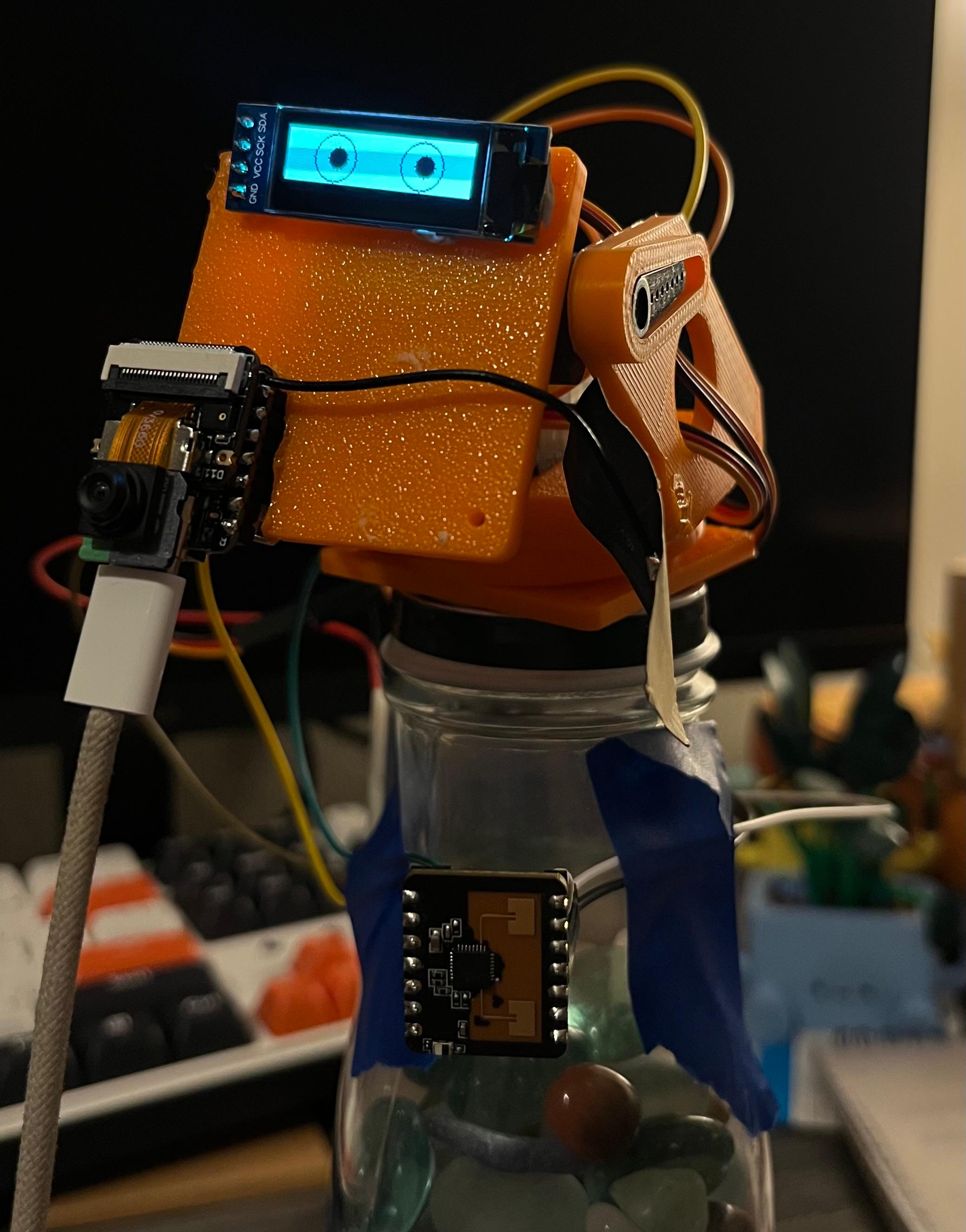
Figure 2 — MIRA hardware assembly. Orange 3D-printed head, SSD1306 OLED eyes, OV2640 camera module, pan-tilt servo structure, and the XIAO ESP32-S3 Sense board mounted at the base.
Component specification
| Component | Part | Specification |
|---|---|---|
| MCU | Seeed XIAO ESP32-S3 Sense | Dual-core Xtensa LX7 @ 240 MHz · 512 KB SRAM · 8 MB PSRAM · 8 MB flash |
| Camera | OmniVision OV2640 | Built-in DVP 8-bit · 240×240 RGB565 · ~10 fps with inference active |
| Display | SSD1306 OLED (I2C) | 128×64 px · animated eye bitmaps · system status feedback |
| Audio | PDM MEMS Microphone (I2S) | Built-in · async DMA capture · activated by open_palm gesture only |
| Actuation | 2× Servo (PWM/LEDC) | Pan GPIO 2 · Tilt GPIO 3 · Kalman-filtered face-tracking controller |
| LLM backend | Gemma 4 2B / Groq API | Local CPU inference (offline) or llama-4-scout-17b via Groq (~1–3 s) |
| Storage | MicroSD (SPI) | Optional · snapshot dataset collection · gesture template persistence |
GPIO mapping
| GPIO | Function | Interface |
|---|---|---|
GPIO 2 | Servo Pan | LEDC PWM |
GPIO 3 | Servo Tilt | LEDC PWM |
GPIO 5 | I2C SDA (OLED) | I2C |
GPIO 6 | I2C SCL (OLED) | I2C |
GPIO 42 | I2S Microphone Data | I2S DMA |
Compute constraint
03 · Architecture
System Architecture
MIRA is organized as two cooperating layers. The embedded firmware runs on the ESP32-S3 under FreeRTOS and handles all real-time sensing, inference, actuation, and HTTP serving. The Python companion on a connected laptop handles LLM inference, TTS synthesis, and audio post-processing.
flowchart TD
    subgraph ESP["ESP32-S3 (XIAO Sense)"]
        CAM["OV2640 DVP\n240x240 RGB565"]
        BUF["PSRAM frame buffer\n~115 KB"]
        FD["ESP-DL HumanFaceDetect\nMSR + MNP INT8"]
        SERVO["Pan-tilt servo\nKalman filter"]
        OLED["SSD1306 OLED\neye animation"]
        GES["Skin-blob BFS\nGesture classifier"]
        HTTP["/detect /stream\nHTTP endpoints"]
        MIC["I2S DMA Microphone\nopen_palm only"]
        CAM --> BUF --> FD
        FD --> SERVO & OLED & GES
        GES --> HTTP
    end
    subgraph LAPTOP["Laptop Python Companion"]
        ASS["assistant.py\nserial_viewer.py"]
        LLM["Gemma 4 2B (local)\nGroq API (cloud)"]
        TTS["pyttsx3 / Orpheus TTS"]
        ASS --> LLM --> TTS
    end
    HTTP -->|RAW_GRAY + DETECT JSON\nUSB-JTAG| ASS
    ASS -->|CMD text\nHTTP| HTTP
    GES -->|open_palm triggers| MIC
    classDef esp fill:#1a1020,stroke:#c0501a,color:#e0c0b0;
    classDef lap fill:#101a10,stroke:#2d7a4a,color:#b0d0b0;
    class CAM,BUF,FD,SERVO,OLED,GES,HTTP,MIC esp;
    class ASS,LLM,TTS lap;
Figure 3 — Full system data flow. The ESP32-S3 handles sensing, inference, and actuation. The laptop handles LLM and TTS. Communication is bidirectional over USB-JTAG and HTTP.
FreeRTOS task model
| Task | Core | Priority | Responsibility |
|---|---|---|---|
camera_task | Core 1 | High | Frame capture, format conversion, push to vision queue |
vision_task | Core 1 | High | ESP-DL INT8 face/gesture inference, servo update trigger |
uart_console_task | Core 0 | Medium | USB-JTAG command parsing, raw frame streaming |
web_server_task | Core 0 | Low | HTTP dashboard, MJPEG stream, /detect, /status |
oled_task | Core 0 | Low | Animated eye bitmap rendering, system state display |
Interaction state machine
flowchart TD
    START(["● Start"]) --> IDLE
    IDLE["IDLE
Camera DMA off · Servo resting
Min power draw"]
    IDLE -->|face_detected| FACE
    FACE["FACE DETECTED
Camera active · Servo tracking
2-s presence gate running"]
    FACE -->|face_lost| IDLE
    FACE -->|gate elapsed 2s| GATE
    GATE["GESTURE GATE
Monitoring gesture in ROI
No mic / LLM / network"]
    GATE -->|face_lost| IDLE
    GATE -->|open_palm| VOICE
    GATE -->|point| VISION
    GATE -->|closed_fist| FACE
    VOICE["VOICE
Mic DMA active
Audio → LLM → TTS"]
    VISION["VISION
Frame snapshot captured
Image → LLM → TTS"]
    VOICE -->|response_complete| FACE
    VISION -->|response_complete| FACE
    classDef state fill:#1e1e28,stroke:#c0501a,color:#eaeaed,rx:6;
    classDef priv fill:#1a2e1a,stroke:#2d7a4a,color:#b8e0c8,rx:6;
    classDef start fill:#2a1a10,stroke:#e0703a,color:#e0b080;
    class IDLE,FACE,GATE state;
    class VOICE,VISION priv;
    class START start;
Figure 4 — Six-state interaction FSM. Privacy-sensitive resources (microphone DMA, LLM API) are only accessible from the VOICE or VISION states, which require traversal through the 2-second face-presence gate.
State definitions
- IdleCamera DMA disabled. Servo at rest. System monitors for face entry. Minimum power draw. OLED shows resting state.
- Face DetectedCamera active. Face bounding box locked. 2-second presence gate begins. Servo tracks face via Kalman-filtered pan-tilt. OLED eyes follow face.
- Gesture GateSystem observes gesture within face ROI. No audio capture, no LLM call, no network traffic until explicit gesture signal is received.
- Voice (Open Palm)Microphone DMA activates. 3–5 s audio clip captured. Forwarded to LLM (Groq or local Gemma). Response delivered via pyttsx3 or Groq Orpheus TTS.
- Vision (Point)Current PSRAM frame snapshot captured. Sent to LLM with prompt: “What is the object being pointed at?” Response delivered via TTS.
- Cancel (Closed Fist)Stop active recording or pending LLM call. Transition back to Face Detected. Microphone DMA disabled immediately.
Detection JSON schema
{
  "frame_id": 42,
  "obj":       1,
  "kind":      "face",        // "face" | "none"
  "side":      "center",      // "left" | "center" | "right"
  "bbox":      [x1, y1, x2, y2],
  "gesture":   "open_palm",   // "open_palm" | "point" | "hand" | "none"
  "iou":       0.85
}
Vision pipeline
flowchart TD
    CAM["OV2640 DVP capture"] --> BUF["PSRAM frame buffer\n240x240 RGB565 · ~115 KB"]
    BUF -->|parallel| MJPEG["JPEG encode\n→ /stream HTTP (MJPEG)"]
    BUF --> DET["ESP-DL HumanFaceDetect INT8\nMSR: candidate detection\nMNP: landmark regression"]
    DET -->|no face| BACK["Return to Idle state"]
    DET -->|face found| ROI["Face ROI extracted\n(bounding box + landmarks)"]
    ROI --> SERVO["Servo controller\nKalman filter · LEDC PWM"]
    ROI --> OLED["OLED eye renderer\neye pos = face center"]
    ROI --> BFS["Skin-blob BFS\n(YCbCr color space)"]
    BFS --> GES["Gesture classifier\nTemplate IoU matching"]
    GES --> OUT["/detect JSON\n+ USB-JTAG stream"]
    classDef sensor fill:#1a1020,stroke:#c0501a,color:#e0b090;
    classDef output fill:#0f1a2e,stroke:#3b82f6,color:#a0c0e0;
    classDef inactive fill:#1a1a1a,stroke:#444,color:#777;
    class CAM,BUF sensor; class OUT,MJPEG output; class BACK inactive;
Figure 5 — Full on-device vision pipeline from frame capture to detection output. All processing runs on ESP32-S3 LX7 cores with no external compute.
04 · Design Rationale
Human-Centered Design Justification
Each hardware and software decision in MIRA is grounded in a documented human psychological need from Self-Determination Theory (Deci & Ryan, 1985), which identifies three universal intrinsic needs: autonomy, competence, and relatedness. These needs are particularly salient for users with visual impairment, where technology often imposes dependency rather than enabling self-determination.
Self-Determination Theory mapping
| SDT Need | Definition | MIRA Design Decision |
|---|---|---|
| Autonomy | Acting as the author of one’s own behavior, initiating actions from self-chosen values | Gesture-driven activation. The user chooses when the system listens. No wake word, no button, no sighted assistant required. The user sets the pace. |
| Competence | Feeling effective and capable in interactions with the environment | Consistent, predictable gesture vocabulary. Template IoU training adapts to the user’s specific gestures, not a factory model. Deterministic behavior builds trust. |
| Relatedness | Feeling connected and able to participate in shared social and informational environments | Object identification via point gesture restores access to ambient information: “What is on this shelf?”, “What does this sign say?” — normalizing participation. |
Privacy threat model for BVI users
Blind users are disproportionately exposed to surveillance risk because they cannot visually verify camera or microphone state, cannot read on-screen recording indicators, and rely on voice interfaces that are inherently always-on by design. MIRA treats privacy as a psychological safety requirement.
| Threat | Psychological Impact | MIRA Mitigation |
|---|---|---|
| Always-on camera | Constant vulnerability, loss of bodily autonomy | Camera DMA only active when camera_is_enabled() returns true; explicitly toggled by state machine |
| Passive audio capture | Anxiety, chilling effect on speech | Microphone DMA starts only on open_palm after 2-second face gate; stops on closed_fist or timeout |
| Cloud data harvesting | Loss of informational self-determination | Gemma 4 2B runs entirely locally; Groq used only when user selects cloud mode; zero default egress |
| Unpredictable activation | Learned helplessness, erosion of trust | Deterministic FSM: gate → gesture → action; OLED feedback at each transition |
Intentional friction — the 2-second gate
The 2-second face-presence requirement before accepting any gesture is a deliberate application of Human Factors friction design (Norman, The Design of Everyday Things, 1988):
- Reduces false triggers that erode trust in the competence dimension of SDT
- Gives the user time to compose intent before the system acts (autonomy)
- Creates a perceptible feedback loop: face detected → gate timer → gesture → response
- Mirrors the natural human signal of readiness in conversation: eye contact, pause, then speech
- Satisfies Norman’s Feedback Principle for users who cannot interpret a display
05 · Capabilities
System Capabilities
On-device vision
All vision inference runs directly on the ESP32-S3 LX7 cores using Espressif’s ESP-DL library with INT8-quantized models. No external accelerator, cloud upload, or network connection is required for detection. Per-frame inference runs in 100–200 ms, achieving ~5–10 fps.
Gesture vocabulary
| Gesture | Trigger Condition | System Action |
|---|---|---|
| Open Palm | Face present ≥ 2 s, palm facing camera | Activate microphone DMA → capture 3–5 s audio → send to LLM → TTS response |
| Point | Face present ≥ 2 s, index finger extended | Capture PSRAM frame snapshot → query LLM: “What is the object being pointed at?” → TTS |
| Closed Fist | Any active state | Stop current recording or pending LLM call → return to Face Detected state |
LLM backend options
llama-4-scout-17b~1–3 s latency
Requires internet + API key
Orpheus TTS (Diana/Autumn)
Zero data egress
~10–30 s latency
pyttsx3 TTS
Automatic retry logic
Configurable at runtime
WAV encoding
Groq Whisper STT
Groq Orpheus TTS
Gesture training workflow
MIRA learns the user’s specific gesture shapes through a template IoU workflow. No model retraining or firmware recompilation is required. Templates are added over HTTP or the UART console and stored in PSRAM or MicroSD.
sequenceDiagram
    autonumber
    participant Op as Operator
    participant ESP as ESP32-S3
    participant MEM as PSRAM / MicroSD
    Op->>ESP: POST /cmd?op=gesture_train_start
    ESP-->>Op: mode = GESTURE_TRAIN
    Op->>ESP: POST /cmd?op=gesture_label&value=open_palm
    ESP-->>Op: pending_label = open_palm
    Note over Op: Perform gesture in front of camera
    Op->>ESP: POST /cmd?op=mark
    ESP->>MEM: capture ROI frame + store template
    MEM-->>ESP: stored ok
    Note over Op,ESP: Repeat for each gesture label
    Op->>ESP: POST /cmd?op=gesture_train_stop
    ESP-->>Op: mode = EXECUTE
Figure 6 — Operator gesture training sequence over HTTP. Templates persist in PSRAM and optionally on MicroSD across power cycles.
Web dashboard endpoints
| Endpoint | Method | Description |
|---|---|---|
/stream | GET | Multipart MJPEG camera stream |
/snapshot | GET | Single raw grayscale frame + metadata response headers (X-Gesture, X-BBox, X-Pan, X-Tilt) |
/detect | GET | Latest detection JSON (face, gesture, bbox, iou) |
/status | GET | System state: camera on/off, tracking enabled, detection mode, frame id |
/cmd?op=cam_on | POST | Activate camera DMA |
/cmd?op=cam_off | POST | Disable camera DMA |
/cmd?op=track_on | POST | Enable Kalman servo tracking |
/cmd?op=track_off | POST | Disable servo tracking |
/cmd?op=mark | POST | Store current frame as training template |
06 · Privacy & Safety
Privacy Architecture & Failure Modes
The gesture-gate is not merely a UX convenience — it is the primary privacy enforcement mechanism. This section formalizes the activation decision flow and the system’s behavior under failure conditions.
Activation decision flowchart
flowchart TD
    START(["New frame received"]) --> FD{"Face\ndetected?"}
    FD -->|No| IDLE["Return to Idle\nCamera DMA off"]
    FD -->|Yes| GATE{"Face present\n≥ 2 seconds?"}
    GATE -->|No| TIMER["Continue gate timer\nstay in FaceDetected"]
    GATE -->|Yes| GES{"Gesture\ndetected?"}
    GES -->|No| REMAIN["Remain in Gesture Gate\nwait for next frame"]
    GES -->|Yes| WHICH{"Which\ngesture?"}
    WHICH -->|open_palm| MIC["Activate mic DMA\nCapture 3-5 s audio\n→ LLM → TTS"]
    WHICH -->|point| SNAP["Capture frame snapshot\nQuery LLM: object ID\n→ TTS"]
    WHICH -->|closed_fist| CANCEL["Cancel active ops\nReturn to FaceDetected"]
    MIC --> DONE(["FaceDetected state"])
    SNAP --> DONE
    CANCEL --> DONE
    classDef decision fill:#2a1a0a,stroke:#c0501a,color:#e0b090;
    classDef action fill:#0a1a2a,stroke:#3b82f6,color:#a0c0e0;
    classDef terminal fill:#1a2a1a,stroke:#2d7a4a,color:#a8d8b8;
    classDef idle fill:#1a1a1a,stroke:#444,color:#777;
    class FD,GATE,GES,WHICH decision;
    class MIC,SNAP,CANCEL action;
    class DONE,START terminal;
    class IDLE,TIMER,REMAIN idle;
Figure 7 — Per-frame activation decision tree. Privacy-sensitive resources are unreachable without passing through the 2-second face-presence gate.
Failure modes and mitigations
| Failure Mode | Trigger | System Behavior | Privacy Impact |
|---|---|---|---|
| Face false positive | Object resembles face | Gate starts; no gesture match likely | Low: gate prevents audio/LLM activation |
| Gesture false positive | Incidental hand movement | Gate checks face presence first | Low: gate must already be satisfied |
| LLM API timeout | Network failure | Auto-fallback to local Gemma 4 2B | None: no data leaves device on fallback |
| Camera DMA stall | PSRAM contention | Frame marked stale; inference skipped | None: stale frame does not trigger action |
| Power-cycle mid-audio | Unexpected reset | Microphone DMA stops immediately | None: no partial data stored or transmitted |
07 · Demo
MIRA in Operation
08 · Build & Flash
Quick Start
Requirements: ESP-IDF v5.x or v6.x (tested on Windows with PowerShell and Ubuntu 22.04). Python 3.9+ required for the companion.
1 — Clone & configure
git clone https://github.com/Shi6aSK/MIRA.git
cd MIRA

# Set Wi-Fi credentials in main/vision_config.h before building:
#   #define WIFI_SSID "your_ssid"
#   #define WIFI_PASS "your_password"
2 — Build & flash firmware
# Activate ESP-IDF environment (Windows PowerShell)
. $env:IDF_PATH/export.ps1

# Build
idf.py build

# Flash and monitor (replace COM3 with your port)
idf.py -p COM3 flash monitor
3 — Run the Python companion
cd tools
pip install -r requirements.txt

# Headless assistant (recommended)
python assistant.py --host http://192.168.X.X

# GUI frame viewer (serial mode, COM5 or /dev/ttyUSB0)
python serial_viewer.py
Console commands (USB-JTAG)
| Command | Effect |
|---|---|
stream_on | Enable raw-frame + detection JSON stream over USB-JTAG |
stream_off | Disable stream |
track_on | Enable Kalman servo face-tracking |
track_off | Disable servo tracking |
status | Print current detection state, frame id, tracking mode |
09 · Code
Repository Structure
Firmware — ESP32-S3 / ESP-IDF
| File | Purpose |
|---|---|
main/main.c | Entry point — FreeRTOS task creation, peripheral initialization, app_main |
main/camera_control.c/.h | OV2640 init, DVP capture, PSRAM frame buffer, DMA management |
main/vision_pipeline.cpp/.h | ESP-DL INT8 HumanFaceDetect, skin-blob BFS gesture classifier, template matching |
main/web_server.c/.h | HTTP dashboard — MJPEG stream, /detect, /status, /cmd, /snapshot |
main/servo_control.c/.h | LEDC PWM pan-tilt driver, Kalman filter state update |
main/oled_control.c/.h | SSD1306 I2C driver, animated eye bitmap renderer, state indicator |
main/mic_capture.c/.h | I2S DMA microphone driver, async audio ring buffer |
main/wifi_manager.c/.h | Wi-Fi station init, IP acquisition, reconnect watchdog |
main/training.c/.h | Template storage, IoU matching, MicroSD persistence |
main/vision_config.h | Compile-time configuration: Wi-Fi, thresholds, GPIO, model paths |
Python companion
| File | Purpose |
|---|---|
tools/assistant.py | Main headless companion — polls /detect, gates audio, calls LLM, runs TTS |
tools/gemma_interface.py | Local Gemma 4 2B model loader and inference wrapper (HuggingFace transformers) |
tools/gemma_proxy.py | Subprocess proxy — isolates model memory from main process; handles OOM gracefully |
tools/serial_viewer.py | GUI frame viewer — PyQt5 raw frame display with detection overlay, serial mode |
backend/orchestrator.py | Multi-step task router for complex interaction sequences |
backend/ai_router.py | Routes queries to Ollama (local) or Groq/OpenAI (cloud) based on config |
backend/robot_controller.py | Safe high-level robot command API — translates intents to servo/display actions |
10 · Comparison
Comparative Analysis
MIRA is compared against three baseline configurations spanning the design space from fully cloud-dependent commercial products to DIY embedded approaches.
| Feature | Commercial (Alexa / Google) | Local LLM only | ESP32 + cloud vision | MIRA (this work) |
|---|---|---|---|---|
| Gesture-gated activation | No | No | No | Yes |
| On-device vision inference | No | No | No (cloud) | Yes (ESP-DL INT8) |
| Zero-screen interface | No | No | No | Yes (OLED + TTS) |
| Local LLM option | No | Yes | No | Yes (Gemma 4 2B) |
| No always-on microphone | No | No | No | Yes |
| Face-tracking actuation | No | No | No | Yes (pan-tilt Kalman) |
| SDT-grounded design | No | No | No | Yes |
| Under $30 hardware cost | No | No | No | Yes (XIAO ESP32-S3) |
| Offline operation | No | Yes | No | Yes (local Gemma) |
References
- R. M. Ryan and E. L. Deci, “Self-Determination Theory and the Facilitation of Intrinsic Motivation, Social Development, and Well-Being,” American Psychologist, vol. 55, no. 1, pp. 68–78, 2000.
- A. Westin, Privacy and Freedom. Atheneum, 1967.
- D. A. Norman, The Design of Everyday Things. Basic Books, 1988.
- Espressif Systems, ESP32-S3 Technical Reference Manual, 2023. espressif.com
- Espressif Systems, ESP-DL — High-performance deep learning library for ESP SoCs, 2024. github.com/espressif/esp-dl